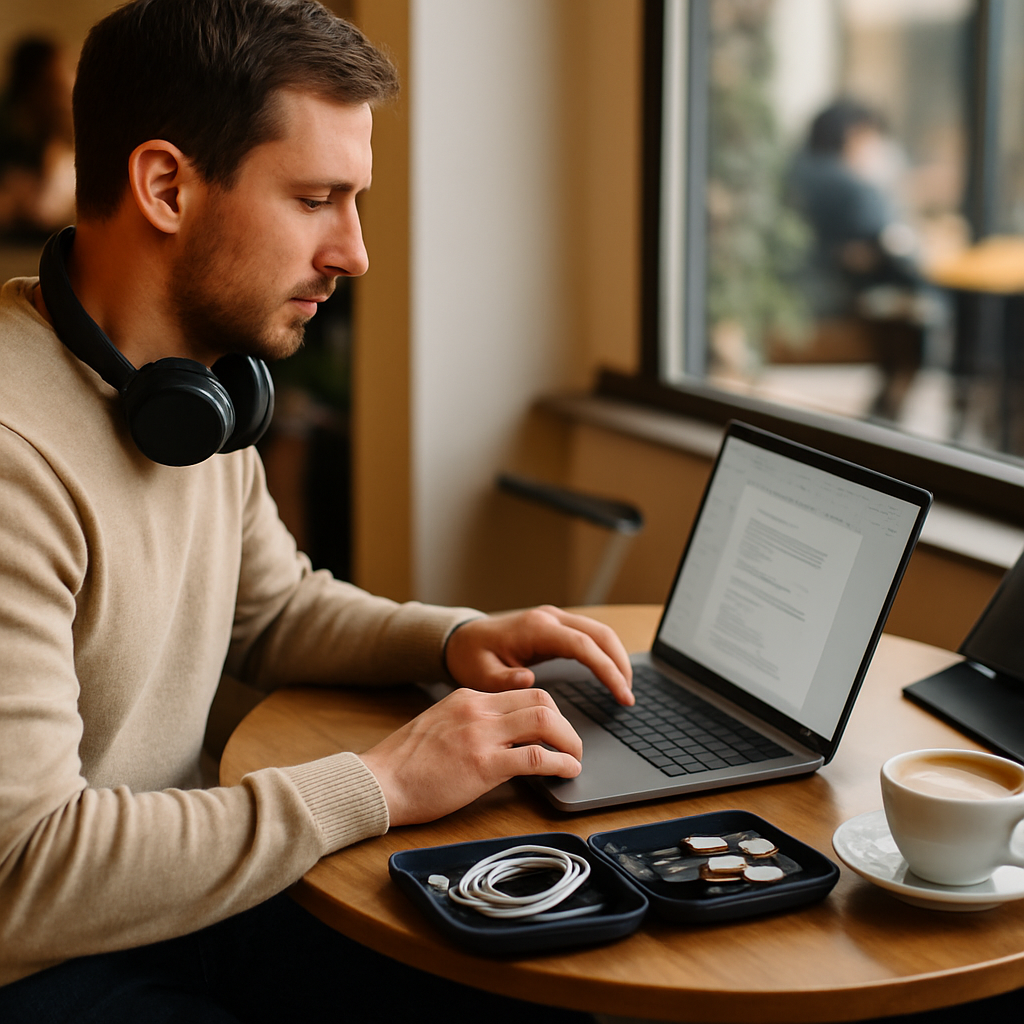
Laptop & Device Guide for Spotfinder Remote Workers
Tony
The Burden of the Heavy Backpack
Imagine you found the perfect café on Spotfinder. It has great coffee and a nice vibe. You pack your bag and head out with excitement. After walking ten minutes, your shoulders start to ache. Your bag feels like a heavy sack of stones. You finally sit down, but your back feels stiff. This physical pain distracts you from your work all day. Choosing the wrong gear can ruin your remote work experience. This is why Laptop and Device Considerations are so vital for your success.
Modern remote work is about freedom and movement. You want to move between different spots easily. A heavy or bulky setup limits this freedom. You might decide to stay home just to avoid the heavy bag. This defeats the purpose of being a digital nomad or remote worker. Understanding your hardware helps you stay mobile and productive. You deserve a setup that supports your lifestyle instead of weighing you down.
This guide will help you understand what to look for in your tech. We will talk about weight, power, and visibility. You do not need to be a computer expert to understand this. We will use simple words and everyday examples. By the end, you will know exactly what you need for your bag. You will be ready to explore every café on your list with ease.
Understanding Laptop and Device Considerations
What exactly do we mean by device considerations? Think of it like packing for a long hike. You wouldn't bring a heavy cast-iron skillet on a mountain trail. You choose lightweight tools that serve many purposes. In the world of remote work, your laptop is your primary tool. It must fit your specific needs and the places where you work.
Your hardware choice is part of your Essential Café Work Setup and Equipment. This category includes everything you carry to be productive. It covers your computer, your chargers, and your accessories. A good setup feels invisible while you are working. It just works without causing any stress or technical problems. You want to focus on your tasks, not on your equipment's failures.
There are three main things you need to remember about your devices. First, the device must be easy to carry. Second, it must last through your work session. Third, it must allow you to see your work clearly. These factors change depending on the environment you choose. A sunny terrace requires different features than a dark corner in a library.
The Importance of Weight and Portability
Weight is perhaps the most important attribute for café hoppers. If a laptop is too heavy, you will leave it at home. Carrying two kilograms on your back feels fine for five minutes. Carrying it all day across a city is very different. You should aim for a device that weighs less than 1.5 kilograms. This allows you to stay energetic throughout your travels.
Portability is not just about the weight on a scale. It is also about the physical size of the device. A 16-inch laptop might be powerful, but it needs a huge table. Many cafés have small, round tables that barely fit a coffee cup. A 13-inch or 14-inch device is often the perfect "sweet spot." It fits on small surfaces and slides easily into most backpacks. Think of your laptop size as your physical footprint in the world.
The materials of the laptop also play a big role here. Magnesium and carbon fiber are very light but very strong. Plastic is often heavier if it needs to be durable. Metal laptops look nice but can add extra weight to your bag. When you look at Laptop and Device Considerations, always check the dimensions. A thin laptop leaves more room for your water bottle and snacks. It makes the transition from "commute mode" to "work mode" much faster.
Power and Battery Life: Your Digital Fuel
Imagine driving a car with a tiny fuel tank. You would always be looking for a gas station. Working in a café with a bad battery is exactly like that. You spend your time hunting for a power outlet. You might have to sit in a dark corner near a wall. This prevents you from sitting by the window or on a comfortable sofa. A long-lasting battery gives you the "power of the middle seat."
When searching for hardware, look for Best Laptops for Café Work by Battery Life. These devices can often run for ten hours or more. This means you can leave your heavy charger at home. Leaving the "power brick" at home makes your bag even lighter. It also removes the stress of your screen suddenly turning off. You can focus deeply on your work for several hours at a time.
Battery life depends on more than just the battery size. The processor inside the laptop is also very important. Modern "ARM-based" chips are very efficient with power. They stay cool and don't need loud fans to stay functional. Efficiency is the secret to a long workday without a plug. Always read real-world reviews before you buy a new device. Manufacturers often exaggerate how long a battery will actually last in a café.
In the context of Best Laptops for Café Work by Battery Life, consider your screen brightness. High brightness drains the battery very quickly. Some laptops have "low-power" display options that save energy. Using dark mode in your apps can also help a little bit. Every saved minute of power is a minute of extra freedom. You want to be the person who finishes their work before the battery dies.
- Check the Watt-hours (Wh): A higher number usually means a bigger fuel tank.
- Look for Efficient Processors: Modern chips use less energy for the same tasks.
- Review Real-World Tests: See how long it lasts with WiFi and many tabs open.
- Avoid Dedicated Graphics: Unless you edit video, they just drain your battery.
Screens and Visibility: Fighting the Glare
Cafés are beautiful because of their big windows and natural light. However, light can be the enemy of your computer screen. If your screen is like a mirror, you will see your own face. You will struggle to read your emails or see your code. This causes eye strain and can even lead to headaches. You need a screen that can fight against bright ambient light.
This is where you should look for Screen Privacy and Anti-Glare Solutions. A matte screen finish is usually better than a glossy one. It scatters the light instead of reflecting it back at you. If your laptop has a glossy screen, you can buy a special filter. These filters stick to your screen and reduce the annoying reflections. They make working in a sunny window a much better experience.
Privacy is another big concern when you are working in public. You might be looking at sensitive client data or private emails. You don't want the person at the next table reading over your shoulder. Using Screen Privacy and Anti-Glare Solutions helps protect your data. These "privacy shields" make the screen look black from the side. Only the person sitting directly in front of the laptop can see the content. It is like having a secret window that only you can use.
Brightness levels are measured in "nits." For a café, you want at least 400 nits of brightness. Anything lower will look washed out in a bright room. High-quality screens also show colors more accurately. This is important if you do any creative work or design. A good screen is an investment in your long-term eye health. Don't settle for a dim display just to save a few dollars.
Alternative Devices: Tablets and iPads
Sometimes, a full laptop is actually more than you need. If you mostly answer emails or write, a tablet might be better. Tablets and iPads as Café Work Devices have become very popular. They are extremely thin and fit into almost any small bag. You can pair them with a lightweight Bluetooth keyboard when you need to type. This setup is the ultimate version of a "lightweight" workspace.
One benefit of a tablet is the "modular" nature of the setup. You can use the tablet alone to read or watch videos. When it is time to work, you add the keyboard. Some people find that a tablet helps them focus more. You usually only look at one app at a time on a tablet screen. This reduces the temptation to click away to other distracting websites. It creates a "focused" environment in a busy café.
However, Tablets and iPads as Café Work Devices have some limits. Some professional software only runs on a full computer operating system. If you are a developer or a heavy video editor, a tablet might feel slow. Always check if your must-have apps are available on the tablet store. If they are, you could save a lot of weight in your backpack. It is all about finding the right tool for your specific job.
Tablets also often have built-in cellular data options. You can put a SIM card inside the device. This means you don't have to rely on the café's slow WiFi. You have your own personal internet connection everywhere you go. This adds a layer of security and reliability to your mobile office. It makes you truly independent from the infrastructure of the café.
Expanding Your Digital Real Estate
One problem with small, portable laptops is the limited screen space. It is hard to look at a spreadsheet and a document at the same time. You might find yourself constantly switching between different windows. This can slow down your work and make you feel frustrated. Luckily, there is a modern solution for this specific problem.
You can use Portable Second Monitors for Cafés to double your workspace. These monitors are very thin, like a large tablet. They connect to your laptop with a single USB cable. You don't need a separate power plug for the monitor. It draws power directly from your laptop's battery. This allows you to have a "desktop experience" while sitting in a coffee shop.
Using Portable Second Monitors for Cafés is a game-changer for many professionals. You can put your research on one screen and your writing on the other. It feels very professional and helps you get more done in less time. Just remember that a second screen will drain your laptop battery faster. If you use one, make sure your laptop has a very strong battery. It is a balance between screen space and power consumption.
Quick Summary: The Mobile Tech Checklist
Before you head out to your next Spotfinder location, check these points:
- ✅ Weight: Is my device under 1.5kg?
- ✅ Battery: Can I work for 6+ hours without a plug?
- ✅ Screen: Do I have an anti-glare solution for bright spots?
- ✅ Accessories: Are my cables and keyboard as light as possible?
Essential Café Work Setup and Equipment: Beyond the Device
Your laptop is the heart of your setup, but it's not everything. Essential Café Work Setup and Equipment includes the small things that make life easier. Think about your cables and adapters. A messy nest of wires in your bag is annoying to deal with. Use small pouches to keep your tech organized and protected.
Noise-canceling headphones are also a critical part of this equipment list. Cafés can get very loud with music and talking. Good headphones create a "bubble of silence" around your head. This allows you to focus even in a very busy environment. Some people even use them without music just to block out the noise. They are a tool for mental focus as much as for audio.
Don't forget about ergonomics when you are building your setup. Staring down at a laptop for hours can hurt your neck. A small, foldable laptop stand can lift your screen to eye level. You will need an external mouse and keyboard to use a stand properly. While this adds a little weight, it saves you from back pain. Your health is the most important piece of equipment you own.
How to Choose Your Perfect Device
Choosing a device is like buying a pair of shoes. It must fit you perfectly and be comfortable for a long time. Start by listing the three most important things you do for work. If you write a lot, focus on a great keyboard. If you do visual work, focus on the screen quality. If you move around a lot, focus purely on the weight.
Don't just look at the price tag. A cheap laptop might seem like a good deal at first. However, if the battery only lasts two hours, it will frustrate you. If the screen is too dim to use outdoors, you have wasted your money. Think about the "cost per hour of happy work." A slightly more expensive device that works perfectly is a better investment. It will pay for itself through your increased productivity and comfort.
Always try to hold the device in your hands before you buy it. Visit a store and feel the weight of the laptop. Type a few sentences on the keyboard to see how it feels. Check how easy it is to open and close with one hand. These small details become very important when you use the device every day. Your laptop should be a tool you love to use, not just a machine you tolerate.
Common Beginner Mistakes with Remote Work Gear
Many people start their remote work journey with the wrong gear. One common mistake is bringing a massive "gaming" laptop to a café. These laptops are powerful, but they are heavy and loud. Their batteries usually die in less than three hours. They also require huge power bricks that take up too much space. A gaming laptop is like a race car; it's great for speed but bad for a grocery run.
Another mistake is ignoring the importance of "dongles" or adapters. Many modern laptops only have one or two small USB-C ports. If you need to plug in a monitor or a USB drive, you need an adapter. Forgetting your adapter at home can stop your work day instantly. Always keep your necessary adapters in your laptop bag. It is better to have them and not need them than to need them and not have them.
Beginners also often forget to test their setup at home first. Don't go to a café with a brand-new device you haven't turned on yet. Software updates can take hours and eat up all your data. Make sure all your apps are installed and working before you leave. Test your "mobile hotspot" to make sure your phone can share internet. A "dry run" at home prevents embarrassing tech issues in public.
Device Security in Public Spaces
When you work in a café, you are in a public space. This means you must think about physical and digital security. Never leave your laptop unattended, even for a minute. If you need to go to the restroom, take your bag with you. It might seem like a hassle, but it's better than losing your computer. A stolen laptop is a massive blow to your work and your wallet.
Digital security is just as important as physical security. Public WiFi networks are often "unsecured." This means other people on the network could potentially see your data. Always use a VPN (Virtual Private Network) when you connect to café WiFi. A VPN encrypts your connection and keeps your data safe from hackers. It is like sending your data through a private, locked tunnel.
Consider using a "Kensington lock" if you work in one spot for a long time. This is a metal cable that locks your laptop to a table or chair. It won't stop a determined thief with tools, but it prevents "snatch and grab" theft. Most importantly, always have a backup of your data. If your device is lost or broken, your work should be safe in the cloud. Security is about being prepared for the worst while hoping for the best.
Semantic Comparison of Device Types
| Attribute | Ultrabook | Tablet/iPad | Workstation |
|---|---|---|---|
| Portability | Excellent | Best | Poor |
| Performance | Good | Moderate | Excellent |
| Battery Life | 8-12 Hours | 9-10 Hours | 3-5 Hours |
| Best Use Case | General Work | Writing/Admin | Video/3D |
Step-by-Step: Setting Up Your Workspace in a Café
So, you have arrived at a café from Spotfinder. How do you set up for a productive session? Follow these simple steps to get started correctly. First, find a seat that matches your needs. If it's sunny, look for a spot away from direct glare. If your battery is low, look for a seat near a wall outlet. Checking your environment first saves you from moving later.
Second, unpack your Laptop and Device Considerations items carefully. Place your laptop on the table and check the stability. Some café tables are wobbly, which can be very annoying. Use a folded napkin or a piece of cardboard to stabilize a shaky table leg. This small trick makes a big difference in your comfort. Then, connect your mouse or second screen if you are using one.
Third, connect to the internet and secure your connection. Turn on your VPN before you log into any sensitive accounts. Check your audio settings if you plan to listen to music or take a call. Once your "digital office" is ready, put your bag in a safe spot. You can loop a bag strap around your leg for extra security. Now you are ready to focus and enjoy your coffee while you work.
Future Trends: What's Next for Remote Devices?
The world of technology is always changing. We are seeing exciting new developments for remote workers. Foldable screens are becoming more common. Imagine a laptop that is the size of a book but opens up into a large screen. This would be the ultimate solution for portability and productivity. We are also seeing better battery technology that charges much faster.
Artificial Intelligence (AI) is also changing how our devices work. New laptops have special AI chips that manage power more intelligently. They can blur your background in video calls without using much battery. They can also filter out background noise from a busy café more effectively. Your laptop is becoming a smarter assistant that helps you work in public spaces.
Cloud computing is making the "power" of your local device less important. If you can run heavy software on a powerful server in the cloud, you don't need a heavy laptop. You only need a good screen and a fast internet connection. This could make Tablets and iPads as Café Work Devices even more capable in the future. The goal is to make the hardware disappear so only the work remains.
Managing Your Digital Wellbeing
Working in cafés is great, but it can be exhausting. The constant noise and movement can drain your mental energy. It is important to take regular breaks from your screen. Every 20 minutes, look at something far away for 20 seconds. This helps prevent "computer vision syndrome" and keeps your eyes fresh. Stand up and stretch every hour to keep your blood flowing.
Remember that you don't have to be productive every single second. Part of the joy of café work is the environment itself. Take a moment to enjoy your coffee and look around. This "mental reset" can actually make you more creative when you return to your task. Your devices are there to serve you, not the other way around. Don't let your notifications control your life.
Set clear boundaries for when your work day starts and ends. It is easy to keep working into the evening when your office is in your bag. When you leave the café, try to "log off" mentally as well. Put your laptop away and focus on the world around you. This balance is the secret to a long and happy career as a remote professional. Your gear helps you work, but your mindset helps you live.
Summary: The 5 Key Insights for Your Tech Journey
We have covered a lot of information about Laptop and Device Considerations. Here are the most important things to remember as you build your setup:
- Weight is everything: Choose a device under 1.5kg to stay mobile and pain-free.
- Prioritize Battery: Look for Best Laptops for Café Work by Battery Life to avoid the "outlet hunt."
- Control your Screen: Use Screen Privacy and Anti-Glare Solutions to work comfortably in any light.
- Think Modular: Consider Tablets and iPads as Café Work Devices or Portable Second Monitors for Cafés for flexibility.
- Security First: Always use a VPN and never leave your equipment alone in public.
Your next step is to look at your current gear. Does it meet these requirements? If not, think about what small changes you can make today. Maybe you just need a better bag or a privacy filter. Small improvements can lead to a much better work experience. Explore the locations on Spotfinder and see which setup works best for you!
Frequently Asked Questions
Is a Mac or a PC better for café work?
Both have great options. Modern MacBooks are very popular for their amazing battery life and quiet operation. However, many high-end PC "Ultrabooks" are lighter and offer more ports. Choose the one that runs the software you need for your job.
How do I know if a café has good WiFi before I go?
You can check reviews on Spotfinder or Google Maps. Many users mention the internet speed and reliability. You can also use "Speedtest" apps as soon as you arrive. If the WiFi is bad, have your phone ready as a backup hotspot.
Can I use a tablet as my only work device?
Yes, many people do this! If your work is based on writing, email, or web-based tools, a tablet is often enough. Just make sure you have a comfortable keyboard for long typing sessions. It is the most portable way to work from a café.
What is the best way to carry my laptop?
A dedicated laptop backpack is the best choice. It distributes the weight evenly across both shoulders. Look for a bag with a padded compartment to protect your device from bumps. A good bag is a key part of your Essential Café Work Setup and Equipment.